> ## Documentation Index
> Fetch the complete documentation index at: https://test-8862363a-tembo-docs-gpt-6-astra-models.mintlify.site/llms.txt
> Use this file to discover all available pages before exploring further.
# Models
> Supported models, providers, and BYOK options.
Tembo supports multiple model providers across coding agents. The Free plan includes select open-source models through Tembo Managed Inference, while paid plans unlock the full managed model catalog. You can also connect your own model access with BYOK (Bring Your Own Key) or a ChatGPT subscription.
## BYOK (Bring Your Own Key)
BYOK lets your workspace call models with your own provider credentials instead of Tembo-managed credentials.
* Add keys in **Settings -> Models -> API Keys**.
* You can connect OpenAI, Anthropic, Cursor, Amp, and OpenRouter credentials on every Tembo plan, including Free.
* AWS Bedrock and GCP Vertex AI credentials require a paid Tembo plan.
* Tembo still handles orchestration, session context, sandbox execution, and PR automation.
BYOK inference costs \$0 through Tembo. Sessions still use billable cloud VM compute, which draws from your workspace's [usage allowance](/resources/pricing).
### Switch a model between BYOK and Tembo Managed Inference
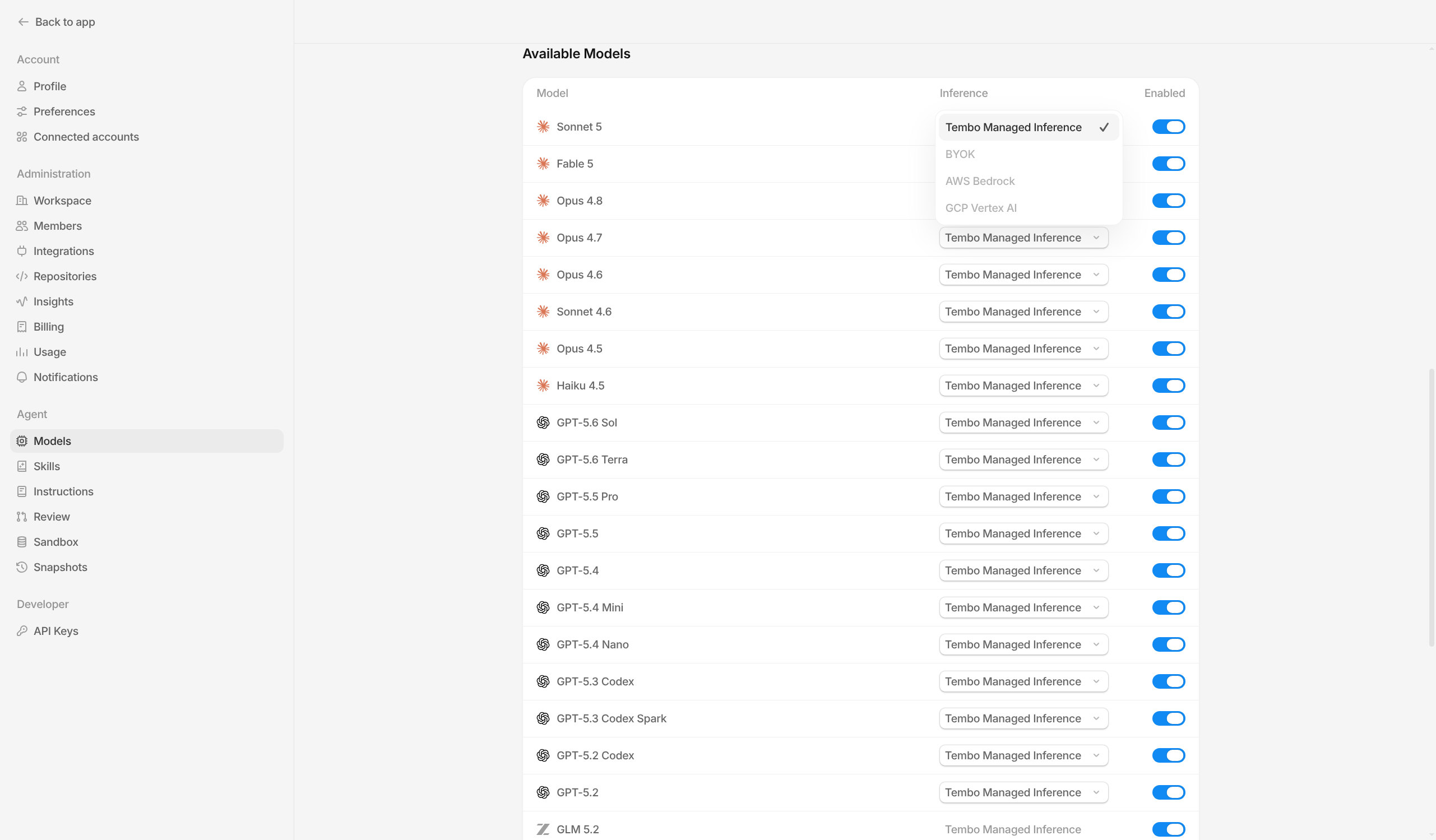
Workspace admins can change the inference provider for individual models from **Settings -> Models**.
In **Available Models**, use the model's **Inference** dropdown to choose **BYOK** or **Tembo Managed Inference**, when those options are available for that model and workspace.
 ### Bedrock BYOK support
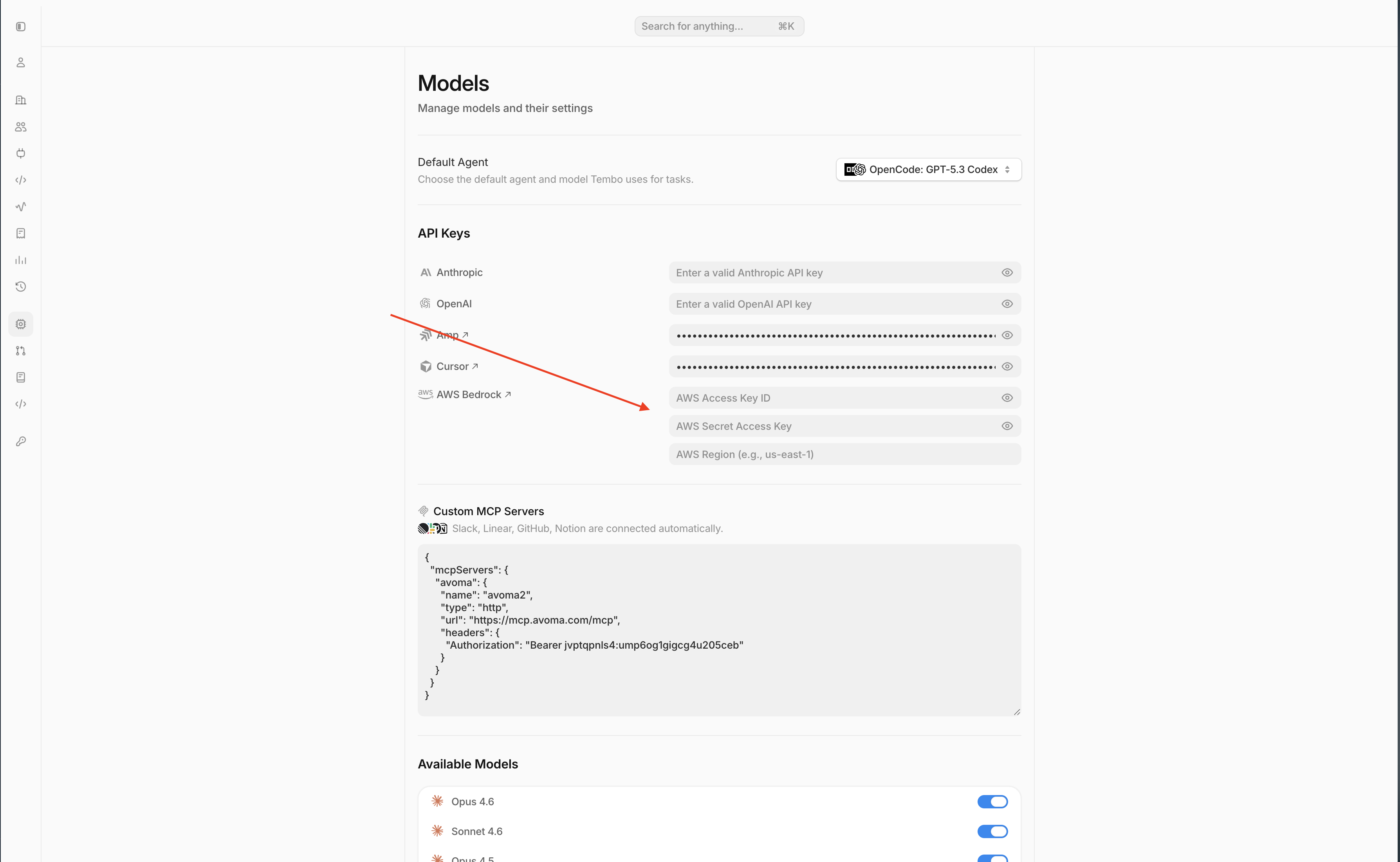
Tembo supports BYOK with Amazon Bedrock.
To enable it, add:
* **AWS Access Key ID**
* **AWS Secret Access Key**
* **AWS Region**
in **Settings -> Models -> API Keys -> AWS Bedrock**.
### Bedrock BYOK support
Tembo supports BYOK with Amazon Bedrock.
To enable it, add:
* **AWS Access Key ID**
* **AWS Secret Access Key**
* **AWS Region**
in **Settings -> Models -> API Keys -> AWS Bedrock**.
 ### GCP Vertex AI BYOK support
Tembo supports BYOK with GCP Vertex AI.
To enable it, add:
* **Service account JSON**
* **Project ID**
* **Location**
in **Settings -> Models -> API Keys -> GCP Vertex AI**.
## Connect a ChatGPT subscription
You can connect a ChatGPT subscription on every Tembo plan, including Free, to use supported OpenAI models with Codex, OpenCode, or Pi. You need a ChatGPT Plus, Pro, Business, Edu, or Enterprise plan.
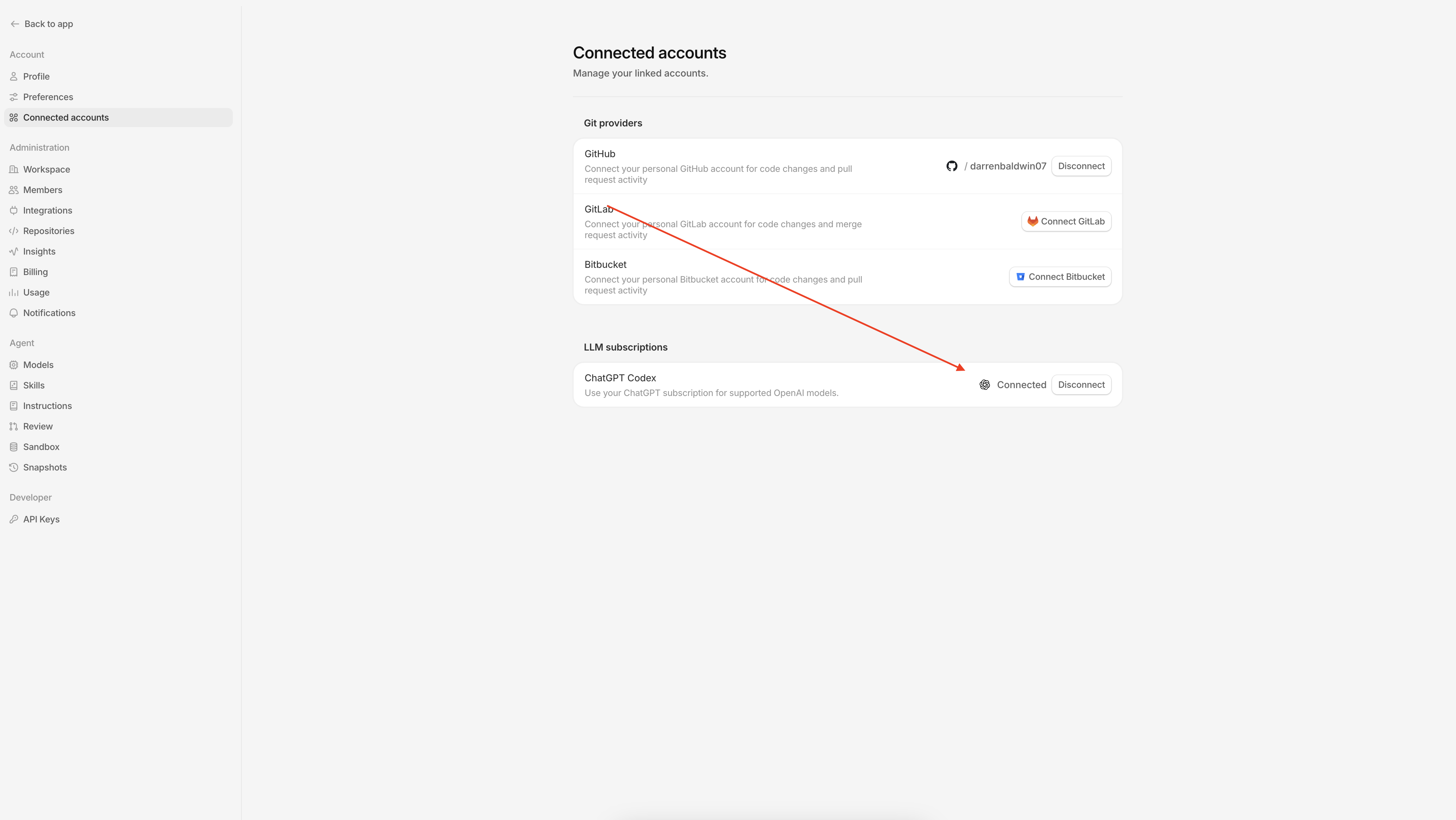
1. Open **Settings > Connected accounts**.
2. Under **LLM subscriptions**, click **Connect Codex**.
3. Copy the authorization code, then click **Open authorization page**.
4. Enter the code in ChatGPT and approve the connection. Keep the Tembo dialog open while authorization completes.
5. Return to Tembo and confirm that **ChatGPT Codex** shows **Connected**.
If prompted, enable device code authorization in [ChatGPT Settings > Security](https://chatgpt.com/settings/security), then try connecting again.
### GCP Vertex AI BYOK support
Tembo supports BYOK with GCP Vertex AI.
To enable it, add:
* **Service account JSON**
* **Project ID**
* **Location**
in **Settings -> Models -> API Keys -> GCP Vertex AI**.
## Connect a ChatGPT subscription
You can connect a ChatGPT subscription on every Tembo plan, including Free, to use supported OpenAI models with Codex, OpenCode, or Pi. You need a ChatGPT Plus, Pro, Business, Edu, or Enterprise plan.
1. Open **Settings > Connected accounts**.
2. Under **LLM subscriptions**, click **Connect Codex**.
3. Copy the authorization code, then click **Open authorization page**.
4. Enter the code in ChatGPT and approve the connection. Keep the Tembo dialog open while authorization completes.
5. Return to Tembo and confirm that **ChatGPT Codex** shows **Connected**.
If prompted, enable device code authorization in [ChatGPT Settings > Security](https://chatgpt.com/settings/security), then try connecting again.
 ## Connect a SuperGrok subscription
You can connect a SuperGrok subscription on every Tembo plan, including Free, to use Grok models with OpenCode or Pi.
1. Open **Settings > Connected accounts**.
2. Under **LLM subscriptions**, click **Connect SuperGrok**.
3. Open the xAI authorization page and enter the code shown in the dialog.
4. Approve the connection in the xAI authorization page. Keep the Tembo dialog open while authorization completes.
5. Return to Tembo and confirm that **SuperGrok** shows **Connected**.
## Supported models
The table below reflects the models currently supported by Tembo.
| Model | Model ID | Provider | BYOK Required |
| ------------------- | --------------------- | --------- | ------------- |
| Opus 5 | `claude-opus-5` | Anthropic | No |
| Fable 5.1 | `claude-fable-5-1` | Anthropic | No |
| Fable 5 | `claude-fable-5` | Anthropic | No |
| Sonnet 5 | `claude-sonnet-5` | Anthropic | No |
| Opus 4.8 | `claude-opus-4-8` | Anthropic | No |
| Opus 4.7 | `claude-opus-4-7` | Anthropic | No |
| Opus 4.6 | `claude-opus-4-6` | Anthropic | No |
| Sonnet 4.6 | `claude-sonnet-4-6` | Anthropic | No |
| Opus 4.5 | `claude-opus-4-5` | Anthropic | No |
| Haiku 4.5 | `claude-4-5-haiku` | Anthropic | No |
| GPT-6 Astra | `gpt-6-astra` | OpenAI | Yes |
| GPT-5.6 Sol | `gpt-5.6-sol` | OpenAI | Yes |
| GPT-5.6 Terra | `gpt-5.6-terra` | OpenAI | Yes |
| GPT-5.6 Luna | `gpt-5.6-luna` | OpenAI | Yes |
| GPT-5.5 Pro | `gpt-5.5-pro` | OpenAI | Yes |
| GPT-5.5 | `gpt-5.5` | OpenAI | Yes |
| GPT-5.4 | `gpt-5.4` | OpenAI | Yes |
| GPT-5.4 Mini | `gpt-5.4-mini` | OpenAI | No |
| GPT-5.4 Nano | `gpt-5.4-nano` | OpenAI | No |
| GPT-5.3 Codex | `gpt-5.3-codex` | OpenAI | No |
| GPT-5.3 Codex Spark | `gpt-5.3-codex-spark` | OpenAI | Yes |
| GPT-5.2 Codex | `gpt-5.2-codex` | OpenAI | No |
| GPT-5.2 | `gpt-5.2` | OpenAI | Yes |
| GLM 5.3 | `glm-5p3` | Z.ai | No |
| GLM 5.3 Flash | `glm-5p3-flash` | Z.ai | No |
| Composer 1.5 | `composer-1.5` | Cursor | Yes |
| Composer 2 | `composer-2` | Cursor | Yes |
| Composer 2 Fast | `composer-2-fast` | Cursor | Yes |
| Composer 2.5 | `composer-2.5` | Cursor | Yes |
| Gemini 3.1 Pro | `gemini-3.1-pro` | Google | No |
| Gemini 3.5 Flash | `gemini-3.5-flash` | Google | No |
| Grok 4.6 | `grok-4.6` | xAI | Yes |
| Kimi K3 | `kimi-k3` | Fireworks | No |
| Kimi K2.6 | `kimi-k2p6` | Fireworks | No |
| Kimi K2.7 Code | `kimi-k2p7-code` | Fireworks | No |
| MiniMax M2.7 | `minimax-m2p7` | MiniMax | No |
| MiniMax M3 | `minimax-m3` | MiniMax | No |
| DeepSeek V4 Pro | `deepseek-v4-pro` | DeepSeek | No |
| DeepSeek V4 Flash | `deepseek-v4-flash` | DeepSeek | No |
Model availability can vary by agent and workspace configuration. If a model is disabled in your workspace, it will not appear in agent pickers until re-enabled.
## Connect a SuperGrok subscription
You can connect a SuperGrok subscription on every Tembo plan, including Free, to use Grok models with OpenCode or Pi.
1. Open **Settings > Connected accounts**.
2. Under **LLM subscriptions**, click **Connect SuperGrok**.
3. Open the xAI authorization page and enter the code shown in the dialog.
4. Approve the connection in the xAI authorization page. Keep the Tembo dialog open while authorization completes.
5. Return to Tembo and confirm that **SuperGrok** shows **Connected**.
## Supported models
The table below reflects the models currently supported by Tembo.
| Model | Model ID | Provider | BYOK Required |
| ------------------- | --------------------- | --------- | ------------- |
| Opus 5 | `claude-opus-5` | Anthropic | No |
| Fable 5.1 | `claude-fable-5-1` | Anthropic | No |
| Fable 5 | `claude-fable-5` | Anthropic | No |
| Sonnet 5 | `claude-sonnet-5` | Anthropic | No |
| Opus 4.8 | `claude-opus-4-8` | Anthropic | No |
| Opus 4.7 | `claude-opus-4-7` | Anthropic | No |
| Opus 4.6 | `claude-opus-4-6` | Anthropic | No |
| Sonnet 4.6 | `claude-sonnet-4-6` | Anthropic | No |
| Opus 4.5 | `claude-opus-4-5` | Anthropic | No |
| Haiku 4.5 | `claude-4-5-haiku` | Anthropic | No |
| GPT-6 Astra | `gpt-6-astra` | OpenAI | Yes |
| GPT-5.6 Sol | `gpt-5.6-sol` | OpenAI | Yes |
| GPT-5.6 Terra | `gpt-5.6-terra` | OpenAI | Yes |
| GPT-5.6 Luna | `gpt-5.6-luna` | OpenAI | Yes |
| GPT-5.5 Pro | `gpt-5.5-pro` | OpenAI | Yes |
| GPT-5.5 | `gpt-5.5` | OpenAI | Yes |
| GPT-5.4 | `gpt-5.4` | OpenAI | Yes |
| GPT-5.4 Mini | `gpt-5.4-mini` | OpenAI | No |
| GPT-5.4 Nano | `gpt-5.4-nano` | OpenAI | No |
| GPT-5.3 Codex | `gpt-5.3-codex` | OpenAI | No |
| GPT-5.3 Codex Spark | `gpt-5.3-codex-spark` | OpenAI | Yes |
| GPT-5.2 Codex | `gpt-5.2-codex` | OpenAI | No |
| GPT-5.2 | `gpt-5.2` | OpenAI | Yes |
| GLM 5.3 | `glm-5p3` | Z.ai | No |
| GLM 5.3 Flash | `glm-5p3-flash` | Z.ai | No |
| Composer 1.5 | `composer-1.5` | Cursor | Yes |
| Composer 2 | `composer-2` | Cursor | Yes |
| Composer 2 Fast | `composer-2-fast` | Cursor | Yes |
| Composer 2.5 | `composer-2.5` | Cursor | Yes |
| Gemini 3.1 Pro | `gemini-3.1-pro` | Google | No |
| Gemini 3.5 Flash | `gemini-3.5-flash` | Google | No |
| Grok 4.6 | `grok-4.6` | xAI | Yes |
| Kimi K3 | `kimi-k3` | Fireworks | No |
| Kimi K2.6 | `kimi-k2p6` | Fireworks | No |
| Kimi K2.7 Code | `kimi-k2p7-code` | Fireworks | No |
| MiniMax M2.7 | `minimax-m2p7` | MiniMax | No |
| MiniMax M3 | `minimax-m3` | MiniMax | No |
| DeepSeek V4 Pro | `deepseek-v4-pro` | DeepSeek | No |
| DeepSeek V4 Flash | `deepseek-v4-flash` | DeepSeek | No |
Model availability can vary by agent and workspace configuration. If a model is disabled in your workspace, it will not appear in agent pickers until re-enabled.